

The agent
The agent plans each message that you send. The agent:
- decides the type of request: a new image, an edit, or no image (then the agent replies with text);
- finds the correct image: it sees the latest image. If your message refers to older items (“the boat”, “the one with the cat”, “undo the hat”), the agent can look at older images or read older messages;
- writes the prompt: a full description for a new image, or an edit instruction that is complete by itself. Optionally, the agent expands the edit instruction into a detailed description of the result. Edit models follow such a description better;
- selects the image model if the menu is set to Auto. It uses the needs of the message (exact words in the image, several references) and the free memory. The agent never overrides a model that you select.
If the agent is not sure, it asks one short question. You can answer the question or send a different request. After you send a message, the chat shows it with Planning…. The app never discards the message. You can continue to type.
The agent makes its decisions from its instructions and tools, not from fixed rules in the code. The code only refuses a request that cannot run, for example an image that does not exist or an edit with no image.
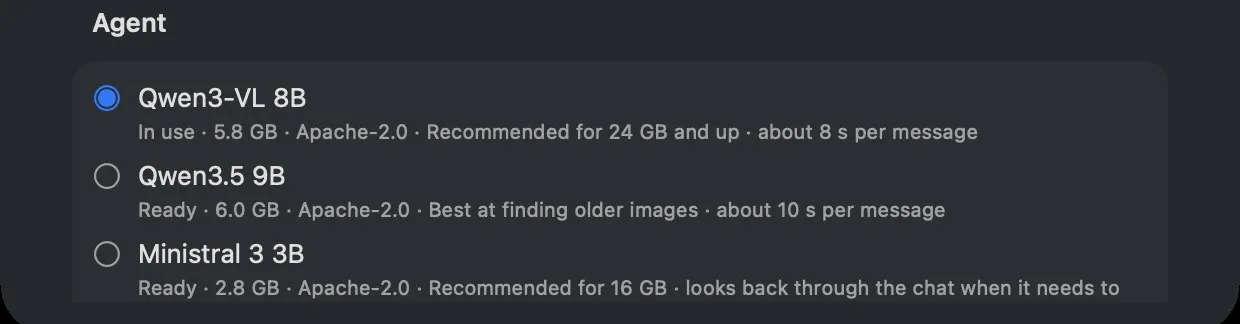
Settings → Intelligence → Agent
| Agent model | Download | Peak memory | Per message | Notes |
|---|---|---|---|---|
| Qwen3-VL 8B | 5.8 GB | 6.2 GB | ~7 s | Default for 24 GB and more |
| Qwen3.5 9B | 6.0 GB | 6.8 GB | ~7.5 s | Best result on the routing eval |
| Ministral 3 3B | 2.8 GB | 4.2 GB | ~5.5 s | Default for less than 24 GB |
| Qwen3-VL 4B | 3.1 GB | 3.7 GB | ~3.5 s | Uses the least memory; seldom examines older images |
These values are from an M5 with 24 GB (2026-11-01). The engine loads the agent only while the agent plans.
The engine removes the agent from memory before the image job starts. If there is no agent model, the engine
uses simple rules to route messages. For more data, refer to
docs/benchmarks/agent-models.md and tasks/.